
Seedance 2.5 Review Scorecard: Nine Test Clips, Eight Criteria, Measured
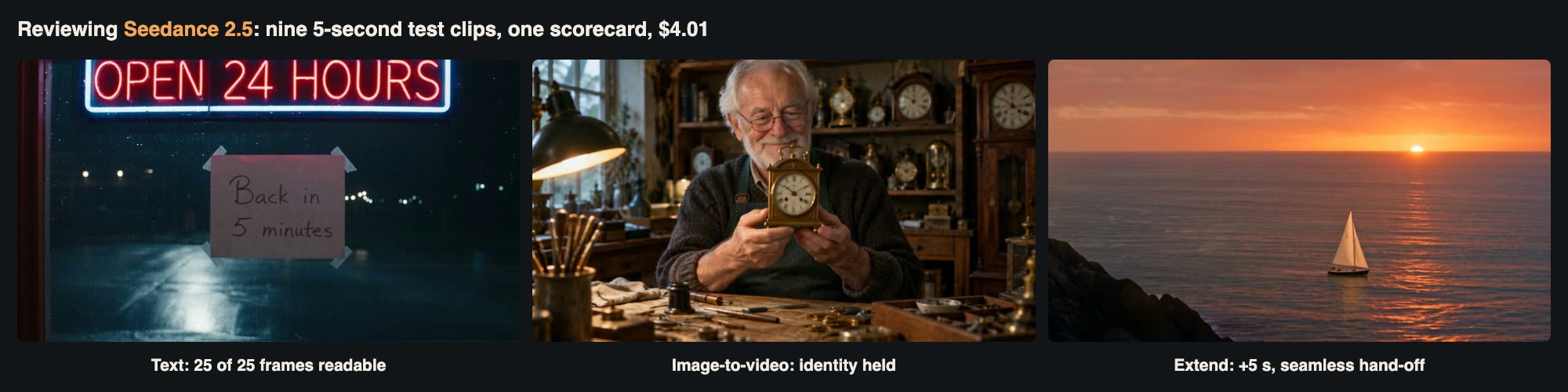
Frames from three of the nine test clips: on-screen text, image-to-video and a video extension.
Most reviews of AI video models are built around a showcase: one impressive clip, a few adjectives and a verdict. That tells you what a model can do on a good day, not what it does on an ordinary request. For a tools directory, where readers compare a dozen video generators, a more useful format is a fixed test battery: the same kinds of prompts for every model, each designed to probe one ability, scored on stated criteria.
This article applies that format to ByteDance's Seedance 2.5. We wrote nine short tests, each targeting one thing that matters when you use a video model for real work: following a detailed prompt, physical motion, camera control, consistency with an input image, readable text, native audio, hard subjects such as hands, extending a clip, and speed and cost. We ran every test once, as a user would, rather than picking the best of several attempts. Every clip was 5 seconds at 480p, the cheapest setting, which keeps the whole review under a fixed budget and reflects how most teams draft. The total bill was $4.01.
All scenes are invented for testing. There are no real people, brands or places in them.
How the scorecard works
We scored Seedance 2.5 from 1 to 5 on eight criteria. Where we could measure something, we did:
Prompt adherence: a prompt with eight checkable elements; the score follows the share delivered.
Motion and physics: liquids, splashes and a card shuffle, judged frame by frame.
Camera control: a two-part camera move, checked against the order requested.
Consistency: an image-to-video clip and an extension, compared with their inputs using frame comparisons and SSIM, a standard image-similarity score.
On-screen text: optical character recognition (OCR) on 25 frames of a clip with two signs.
Native audio: a line of dialogue transcribed with Whisper, plus loudness measured to the EBU R128 standard.
Speed: provider-reported generation time for every job.
Cost: billed cost per clip and per second, including the effect of turning audio off.
A 3 means usable with workarounds, a 4 means reliable with occasional misses, and a 5 means we found no fault in our tests. Nine clips cannot settle every question, and we say where a result rests on a single sample.
How we called the model
Seedance 2.5 is an asynchronous video model. You submit a request with the model ID seedance-2.5, a prompt, a resolution (480p, 720p or 1080p), an aspect ratio and a duration from 4 to 30 seconds, and receive a task ID. You then poll a task endpoint until the clip is ready. Optional fields add a first or last frame (image_with_roles), reference videos (video_urls) for editing or extending, and generate_audio, which is on by default. Here is the helper we used, with the host and key read from environment variables:
Python

import os, time, requests

BASE = os.environ["VIDEO_API_BASE"]      # your provider's /v1 endpoint
HEADERS = {"Authorization": f"Bearer {os.environ['VIDEO_API_KEY']}"}
def clip(prompt, duration=5, resolution="480p", size="16:9", **extra):
    payload = {"model": "seedance-2.5", "prompt": prompt, "duration": duration,
               "resolution": resolution, "size": size, **extra}
    r = requests.post(f"{BASE}/videos/generations", headers=HEADERS,
                      json=payload, timeout=60)
    r.raise_for_status()
    task_id = r.json()["data"][0]["task_id"]
    with open("video_tasks.log", "a") as f:   # log before polling
        f.write(task_id + "\n")
    while True:
        time.sleep(8)
        try:
            d = requests.get(f"{BASE}/tasks/{task_id}", headers=HEADERS,
                             timeout=30).json()["data"]
        except requests.RequestException:
            continue                           # keep polling the same task
        if d["status"] == "completed":
            v = d["result"]["videos"][0]["url"]
            return (v[0] if isinstance(v, list) else v), d.get("cost")
        if d["status"] == "failed":
            raise RuntimeError(d.get("error"))
Logging the task ID before polling is not optional for video. Jobs took between two and three and a half minutes, and during our run the network dropped several times. Because every ID was on disk, we resumed polling instead of submitting again, so no clip was billed twice.
Test 1: prompt adherence with an eight-item checklist
The first prompt packed eight checkable details into one five-second shot: "A red bicycle leans against a blue wooden door on a narrow cobblestone street. A white cat walks from left to right in front of the door. Above the door a round clock shows three o'clock. A woman in a yellow raincoat opens the door and steps out. Light rain begins halfway through. Static camera at eye level, natural street sound."
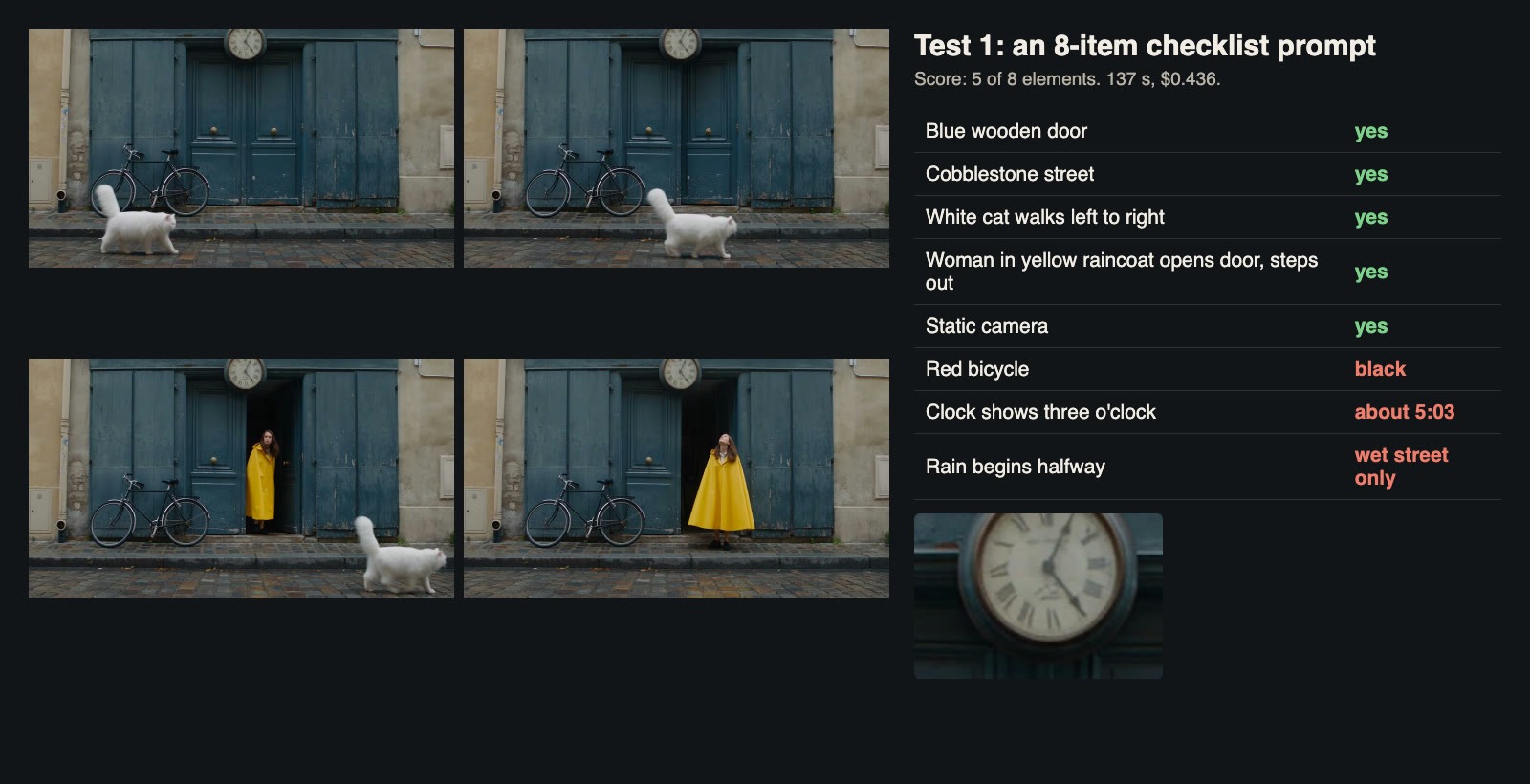 Five of eight elements delivered. The bicycle is black and the clock reads about 5:03.
The clip took 137 seconds and cost $0.436. The scene is attractive and well staged: a weathered blue double door, cobblestones, a fluffy white cat crossing left to right and leaving frame on time, and a woman in a bright yellow cape-style raincoat opening the door from inside and stepping out to look up at the sky. The camera never moves.
Three details were missed. The bicycle is black, not red. The clock, when we zoomed in, shows about three minutes past five. And the rain never visibly starts; the street is wet and the woman looks up as if expecting it, but no drops fall. The pattern is typical of current video models: the main subjects and actions are right, and small attributes such as colours, times and weather changes are dropped when a prompt is crowded. Score: 3. If a detail matters, put it early in the prompt or give it its own shot.
Test 2: motion and physics, and what audio costs
Liquids are a classic physics test. The prompt: "Close-up side view of a glass pitcher pouring orange juice into a clear drinking glass on a wooden kitchen table until the glass is full, a few drops splash on the table, then a hand sets the pitcher down next to the glass." We ran it twice, once with audio and once with generate_audio set to false.
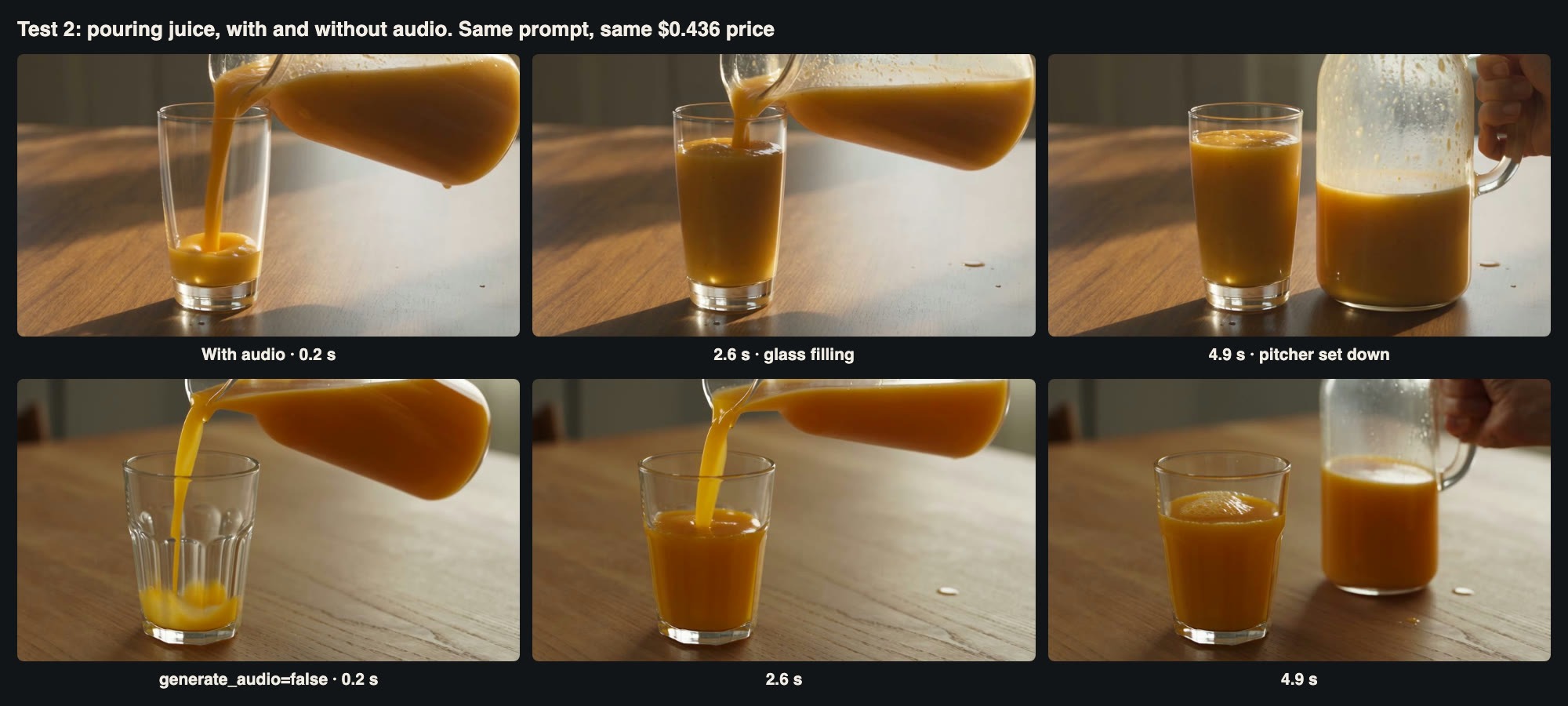 Top row with audio, bottom row silent. Both pour, fill, splash and set the pitcher down in order.
Both clips got the physics right in the ways a viewer notices. The stream of juice thins as the pitcher tilts back, the level in the glass rises steadily, a few drops land on the table, and a hand sets the pitcher down at the end. The two versions were different compositions; the silent one used a faceted tumbler and a cooler light. The juice in the first clip is slightly too opaque, closer to a smoothie, but the motion is convincing.
The pricing result surprised us. Both clips were billed exactly $0.4359. The silent file contained no audio track at all, so you get nothing back for switching audio off. Leave it on and decide later whether to use it. Motion and physics score: 4, after Test 7 is taken into account.
Test 3: camera control
For camera control we asked for a move in two parts: "the camera starts on a wide shot of a white lighthouse on a green cliff at sunset, slowly dollies forward toward it, then pans right to reveal a small sailing boat on the sea. Smooth, steady movement." This took 137 seconds and $0.436.
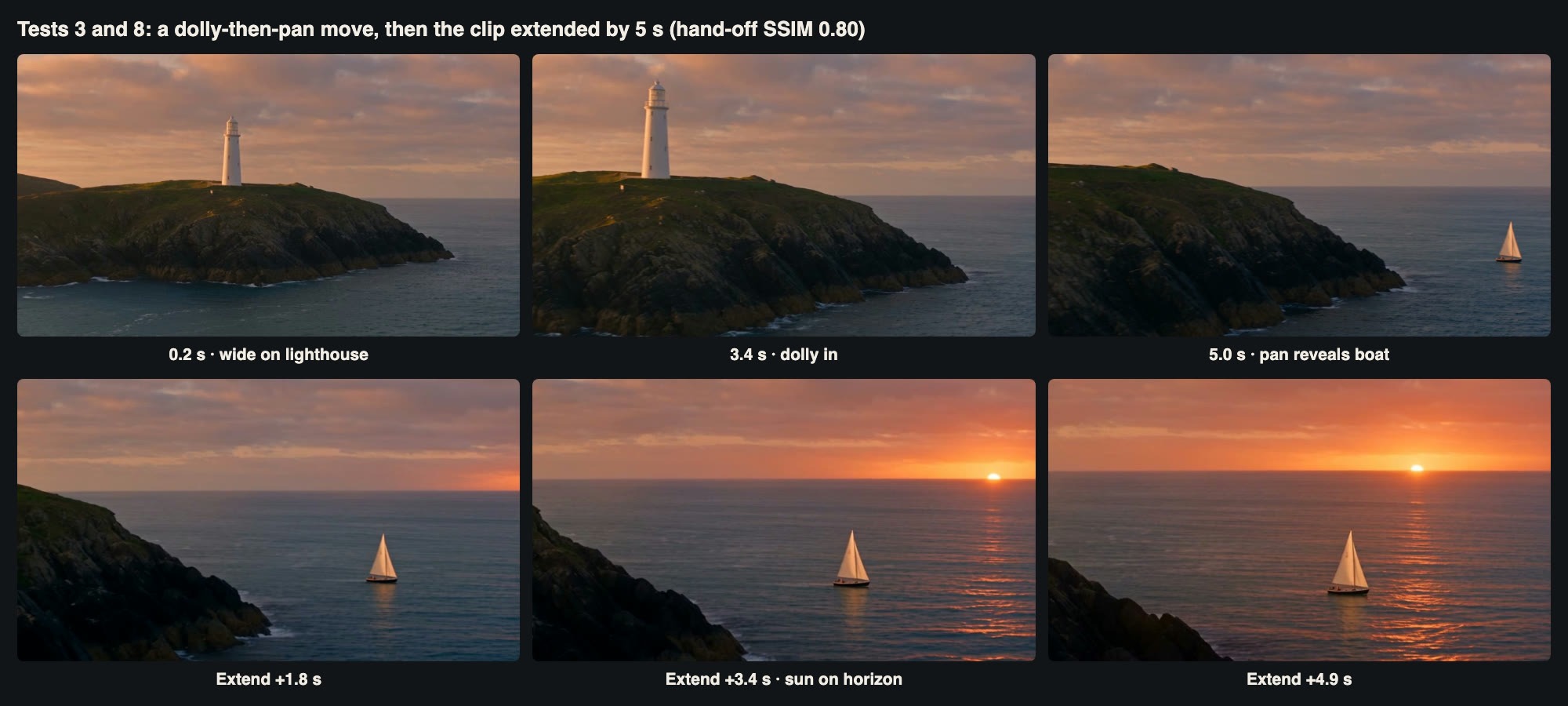 Top: the dolly and pan. Bottom: the same shot extended by five seconds in Test 8.
Seedance executed both parts in the right order, smoothly and without cuts. The lighthouse grows in the frame for the first three seconds, then the camera swings right and the boat appears. The only weakness is timing: the pan starts late, so the boat is fully visible only in the last second. In a real edit you would want the reveal to land earlier, which you could get with a 6- or 8-second duration. Score: 4.
Test 4: consistency with an input image
Image-to-video is how most production work keeps characters and products consistent. We generated a still of a fictional elderly clockmaker at his workbench with GPT Image 2.5 (11 seconds, $0.0064) and passed it to Seedance as the first frame, with the prompt: "The old clockmaker slowly lifts the brass clock, turns it to face the camera and smiles warmly. Static camera. The quiet ticking of many clocks in the workshop." First-frame jobs require the aspect ratio to be set to adaptive.
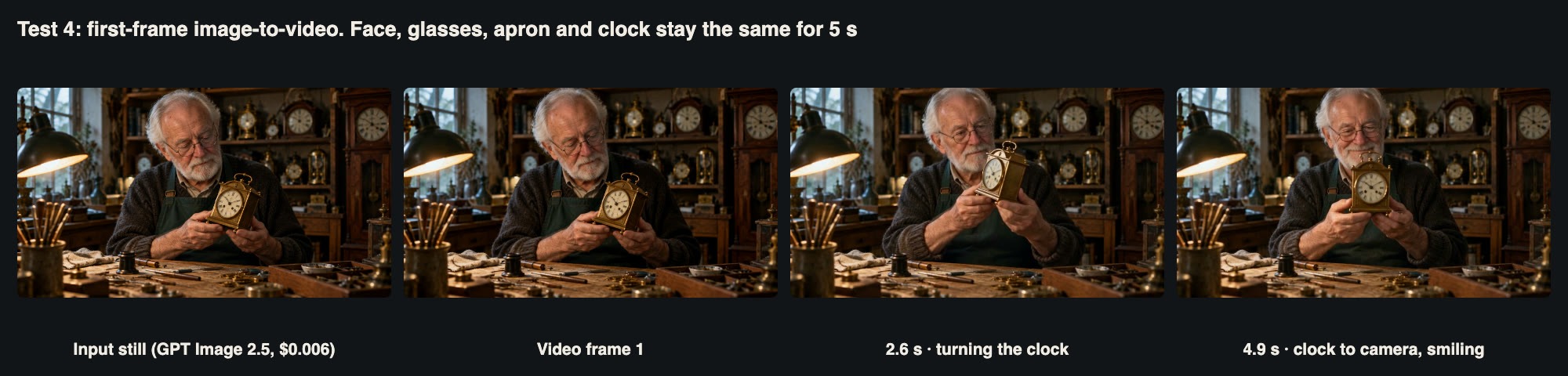 The input still, the first video frame and two later frames. Face, glasses, apron and clock stay the same.
The job took 190 seconds, nearly a minute longer than text-to-video, at the same $0.436. The first frame matched the still in composition and detail, and over five seconds the man's face, beard, glasses, cardigan and apron stayed the same. The brass clock kept its shape and dial as he turned it toward the camera, and the smile at the end was natural rather than fixed. The background clocks and tools did not drift. The similarity score between the input and the first frame was lower than the frames suggest (0.67 SSIM at thumbnail size), mainly because the video frame is slightly brighter and softer; to the eye, it is the same picture. Consistency score: 4, together with Test 8.
Test 5: on-screen text
Text inside video is harder than text in still images, because every frame must render it again. Our prompt: "Night street, light rain. A shop window with a red neon sign that reads exactly "OPEN 24 HOURS", and below it a white paper notice taped to the glass that reads exactly "Back in 5 minutes". The camera slowly pushes in toward the window."
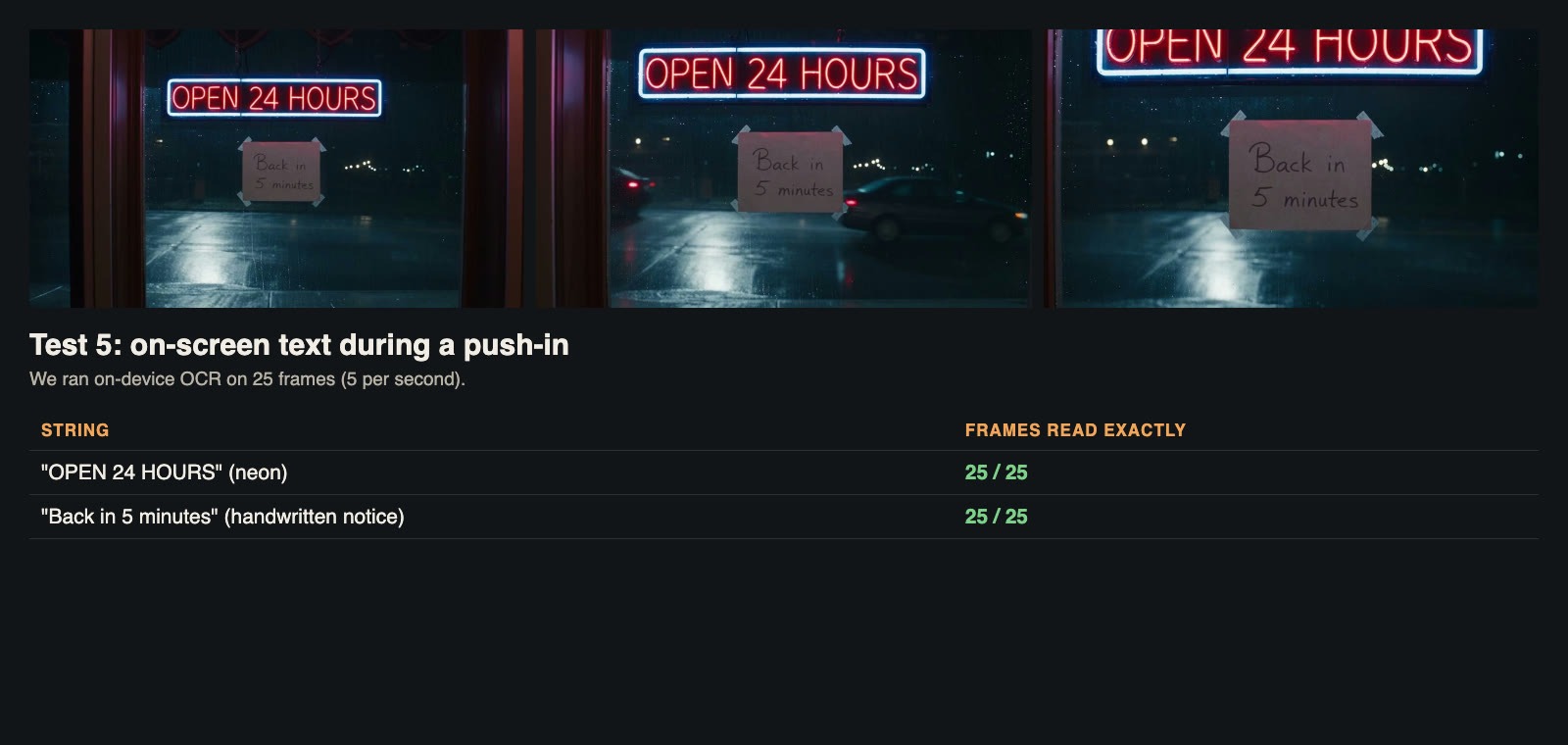 Both strings were read exactly by OCR in all 25 sampled frames.
The clip took 138 seconds. We extracted frames at five per second, 25 in total, and ran on-device OCR on each. "OPEN 24 HOURS" was read exactly in 25 of 25 frames, and the handwritten "Back in 5 minutes" also in 25 of 25, even as the push-in changed the size and perspective of both signs. Cars passed in the background and the reflections on the wet pavement were convincing. This is the best text performance we have measured in a video model at 480p.
The score is not a 5 only because of Test 7, where text the model invented on its own was nonsense. Score: 4. Text you specify in quotes is reliable; text you leave to the model is not.
Test 6: native audio and dialogue
Seedance 2.5 generates synchronised audio in the same pass, including speech. We asked for a short exchange in a cafe: a barista "hands a paper cup across the counter to a customer and says clearly and cheerfully: "One oat flat white, extra hot. Have a good morning!" The customer smiles and takes the cup." We also asked for a green apron.
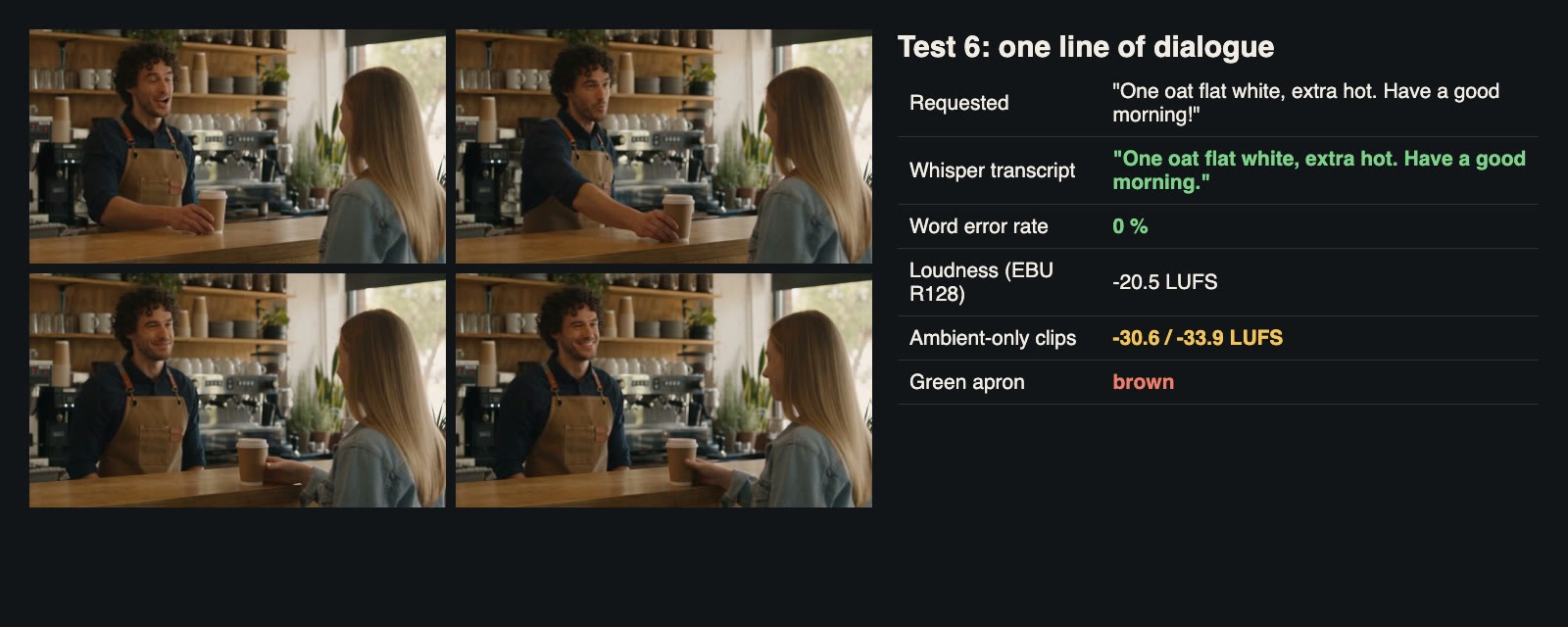 The spoken line transcribed with zero word errors; the apron came out brown.
The clip took 146 seconds. We transcribed it with Whisper, and the transcript matched the requested line word for word: a word error rate of zero. The mouth movements fit the speech, the cup handover happens on the line, and the cafe ambience sits quietly underneath. The dialogue clip measured -20.5 LUFS integrated loudness, a sensible level for web video.
The clips without dialogue were much quieter: -30.6 LUFS for the pouring clip and -33.9 LUFS for the street scene. The sound is there, but you will need to normalise it before publishing, and the levels will not match between clips. As in Test 1, a colour detail was dropped: the apron is tan-brown, not green. Audio score: 4.
We think this test is the strongest argument for the model. If you want to run the same dialogue test on your own lines, the Seedance 2.5 API takes the spoken words directly in the prompt, as shown above, with no separate voice track or lip-sync step needed.
Test 7: hands and playing cards, the stress test
Every video model has failure modes, and a review should look for them deliberately. Hands manipulating small objects are a known weak point, so we asked for "two hands shuffling a deck of playing cards with a riffle shuffle on a green felt table, then fanning the cards out in a neat arc face up". This took 157 seconds, the slowest text-to-video job.
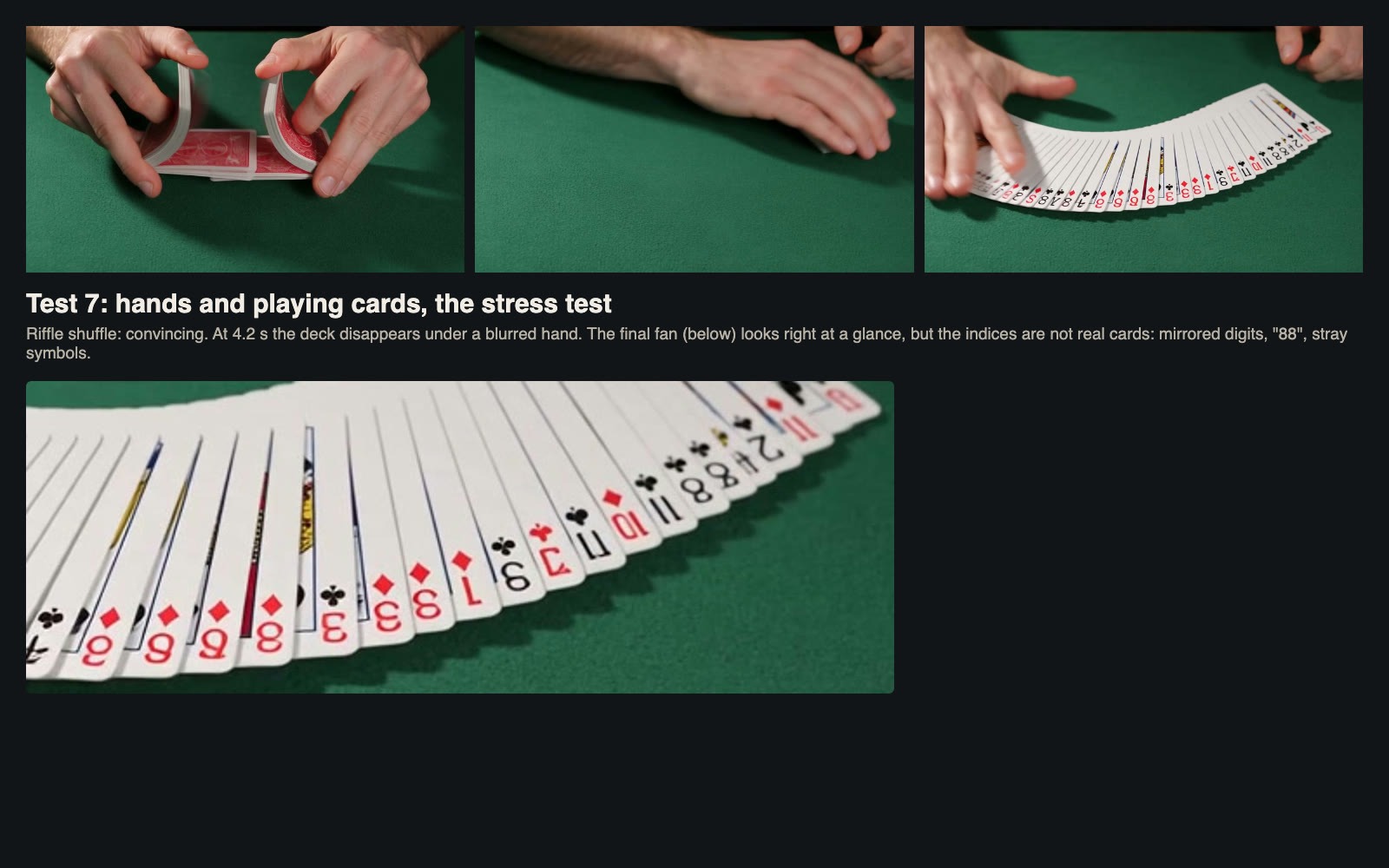 The shuffle is convincing; the card faces in the final fan are not real cards.
The first half was impressive. The riffle shuffle looks right, with cards flexing and interleaving and fingers in plausible positions. The second half broke in two ways. Around 4.2 seconds, the deck disappears under a motion-blurred hand for a few frames, then reappears as a fanned spread. And when we zoomed into the fan, the indices were not a real deck: mirrored digits, a card marked "88", others with stray symbols. At normal viewing speed the clip passes. Paused, it does not. This is the clearest example of the model inventing detail it was not given. It affects our scores for motion (the vanishing deck) and text (the invented indices).
Test 8: extending a clip
Seedance 2.5 can continue an existing video. We passed the lighthouse clip from Test 3 as a reference with omni_reference_task_type set to extend and the prompt: "Extend the video forward: the camera keeps panning slowly with the small sailing boat as it heads out to sea past the lighthouse, and the sun touches the horizon."
The job took 208 seconds and cost $0.519, a little more than a normal clip because the input seconds are billed at a lower rate in addition to the new ones. The output was a new 5-second clip that starts where the original ends. The hand-off was clean: the last frame of the original and the first frame of the extension scored 0.80 SSIM at thumbnail size, and played back to back the cut is invisible. Over the five seconds the camera follows the boat, the cliff slides out of frame and the sun sets onto the horizon, as asked. The light changes faster than a real sunset, but for a continuous establishing shot it works. Together with Test 4, this gives consistency a 4.
Test 9: speed and cost
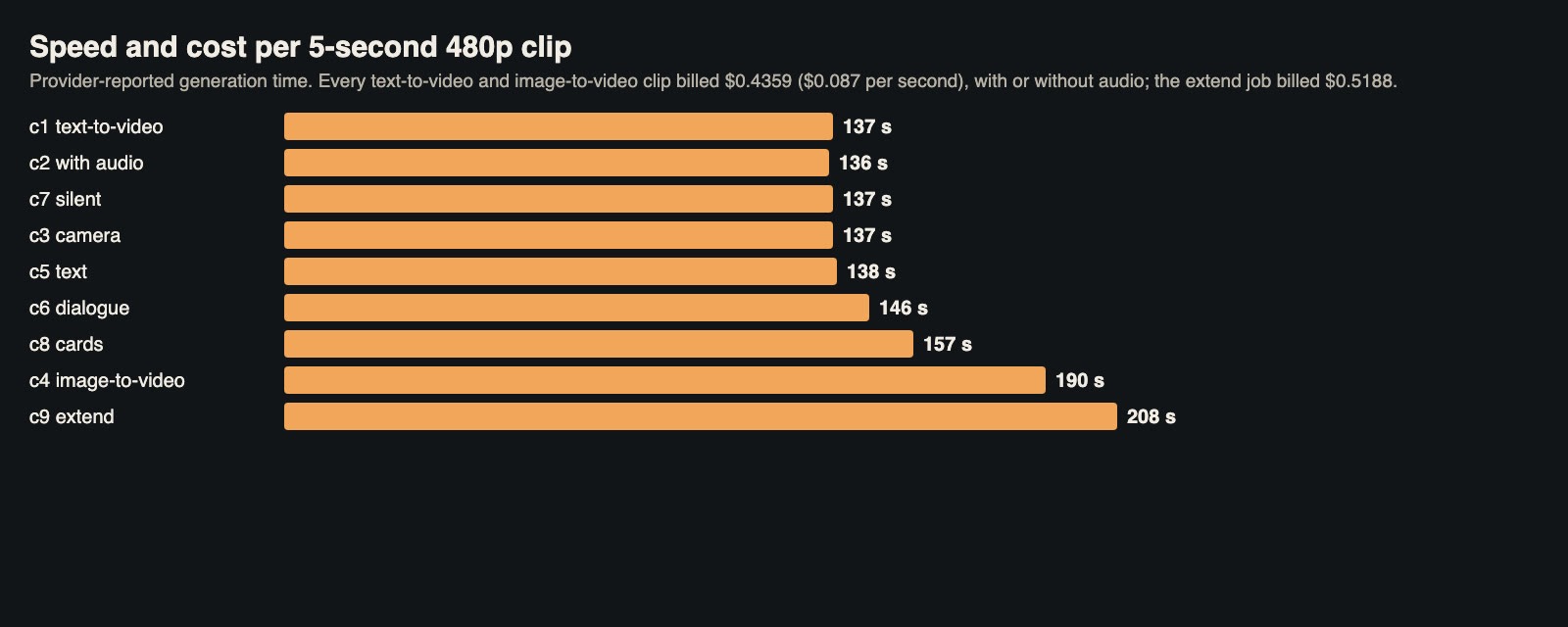 Generation time per clip. Jobs with image or video inputs took about a minute longer.
Seven text-to-video clips took between 136 and 157 seconds each, with a median of 137. The image-to-video job took 190 seconds and the extension 208. All jobs ran in parallel, so the whole battery finished in under four minutes of wall-clock time for the text-to-video batch. For a single creator iterating one prompt at a time, two and a half minutes per 5-second draft is slow compared with image generation; plan to batch variants. Speed score: 3.
Job type | Clips | Billed per clip | Per second |
Text-to-video, 480p, 5 s, audio on | 6 | $0.4359 | $0.087 |
Text-to-video, 480p, 5 s, audio off | 1 | $0.4359 | $0.087 |
Image-to-video, 480p, 5 s | 1 | $0.4359 | $0.087 |
Extend by 5 s, 480p | 1 | $0.5188 | $0.104 per new second |
Input still (image model) | 1 | $0.0064 | |
Total | 10 jobs | $4.01 |
At $0.087 per second, a 480p draft is affordable for exploration: a minute of draft footage costs about $5.20. Higher resolutions cost more per second, so the sensible workflow is to draft at 480p, pick the takes that work and render only those at 720p or 1080p. Because audio costs nothing extra, there is no saving in drafting silently. Cost score: 4.
The scorecard
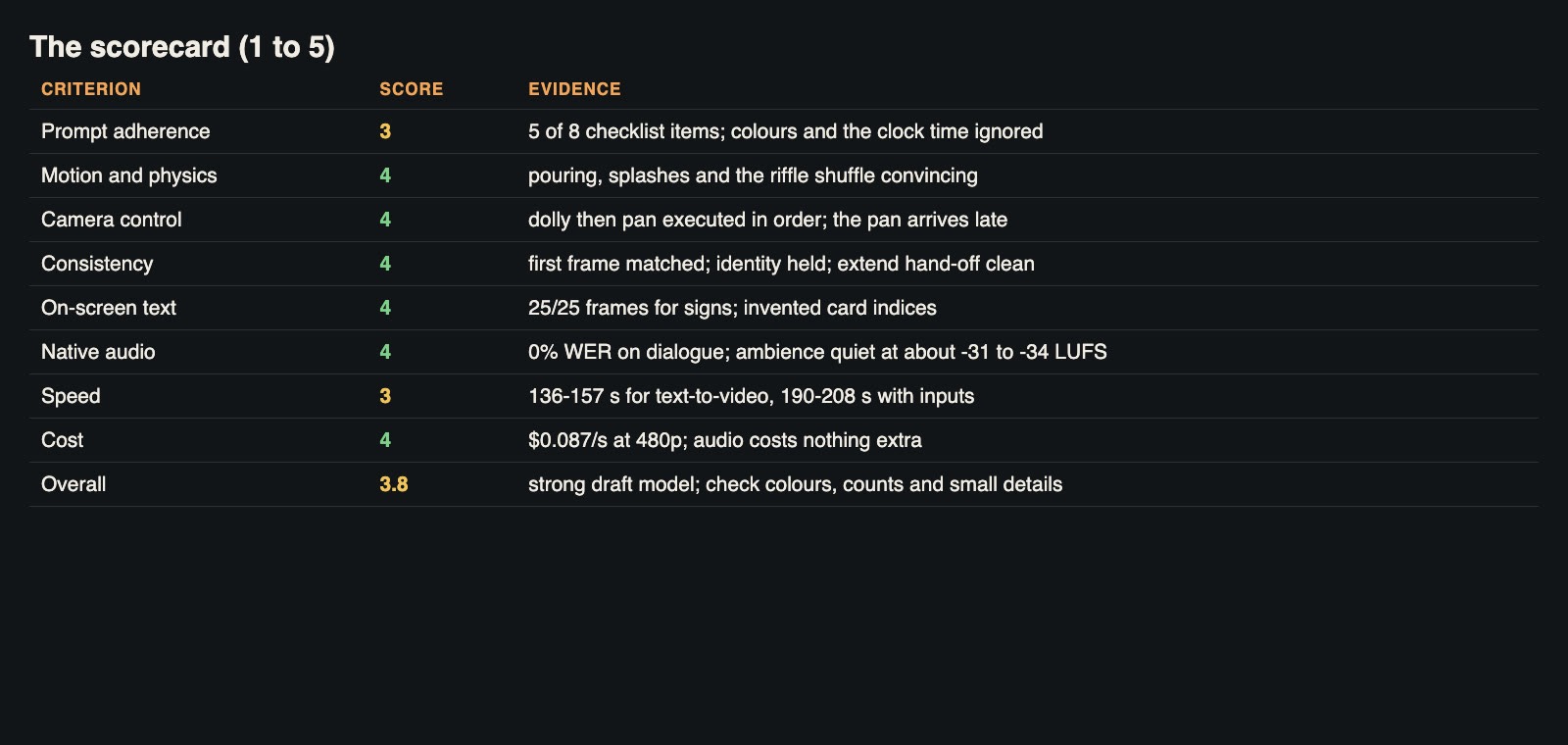 Eight criteria, with the evidence behind each score. Average: 3.8 out of 5.
Averaged across the eight criteria, Seedance 2.5 scores 3.8 out of 5 in our battery. Its strengths are the things that are hardest to fix in post-production: quoted on-screen text that survives camera movement, dialogue with accurate words and lip sync, stable identity from an input image, and clean extensions. Its weaknesses are the things a careful prompt writer or editor can catch: small attributes dropped from crowded prompts, invented details in close-ups, inconsistent loudness, and slow generation.
The walkthrough video
Narrated walkthrough of the nine tests with the original clips (about 3 minutes).
Who should use it, and how
A good fit for short social and marketing clips with a spoken line, product or character shots driven by a reference image, shots that need a sign or caption in the scene, and anyone who wants to build longer shots by extending a strong 5-second take.
Use with care for detailed scenes where every colour and object must be right, close-ups of hands handling small objects, and anything where a viewer might pause and inspect detail, such as cards, keyboards or printed pages.
Not ideal for fast interactive iteration. At two to three and a half minutes per clip, you will want to batch your prompts and review the results together.
Checklist for testing it yourself
Draft at 480p and 5 seconds. It costs $0.44 a clip and reveals most problems.
Keep audio on. Switching it off saved nothing in our tests.
Put critical details first, or give them their own shot. Colours and the clock time were dropped from a crowded prompt.
Quote any text you need. Quoted signs survived in 25 of 25 frames; invented text was nonsense.
Write dialogue into the prompt. The line was transcribed with zero errors.
Normalise loudness. Ambient-only clips came out 10 to 13 LU quieter than dialogue.
Pause on close-ups. Hands and small objects can look right in motion and wrong in a still.
Allow a longer duration for multi-part camera moves. The pan in a 5-second clip arrived late.
Log task IDs before polling. Jobs take minutes, and a dropped connection should never mean paying twice.
The bottom line
Seedance 2.5 earns a 3.8 out of 5 on our scorecard. It is at its best on the hard, valuable problems: accurate dialogue with matching lip movement, readable text during a camera move, an image-driven character that stays the same, and extensions that join seamlessly. It loses points on fine prompt details, invented close-up detail, loudness consistency and speed. For a team that drafts at 480p, reviews carefully and renders only the takes that work, those weaknesses are manageable, and the cost of finding out is low. If you want to run this scorecard on Seedance 2.5 and other video models with the same prompts, you can find them behind one key on APIMart.