
Clever AI Humanizer Review 2026: Features, Pricing, and How It Works
AI writing tools can produce a draft in seconds, but the result often needs another round of editing. Sentences may sound repetitive, transitions can feel predictable, and the overall tone might not suit the intended audience. That's where tools such as Clever AI Humanizer come in.
Clever AI Humanizer is a free online writing tool that helps refine AI-assisted content. Rather than creating an article from scratch, it works with text you already have, adjusting its wording, structure, and tone. Below, we'll look at what the platform offers, how its features work, and where it may fit into a regular writing process.
What Is a Clever AI Humanizer?
Clever AI Humanizer is an online writing assistant developed by CleverFiles Inc. Its main purpose is to make existing text clearer and more natural to read. You can paste a draft into the editor or upload a document, then let the tool produce a revised version.
It works with content created using ChatGPT, Gemini, Claude, DeepSeek, and other AI writing assistants. Typical uses include blog posts, website copy, product descriptions, emails, and business documents. The tool is intended to help users humanize AI text without having to rewrite every sentence themselves.
In June 2026, the company introduced an updated model that it says was trained on a large collection of human-written material. The stated goal was to improve sentence variety, tone, and contextual consistency. These are the developer's claims, so the quality of the output is best assessed by checking the revised text yourself.
Main Features of Clever AI Humanizer
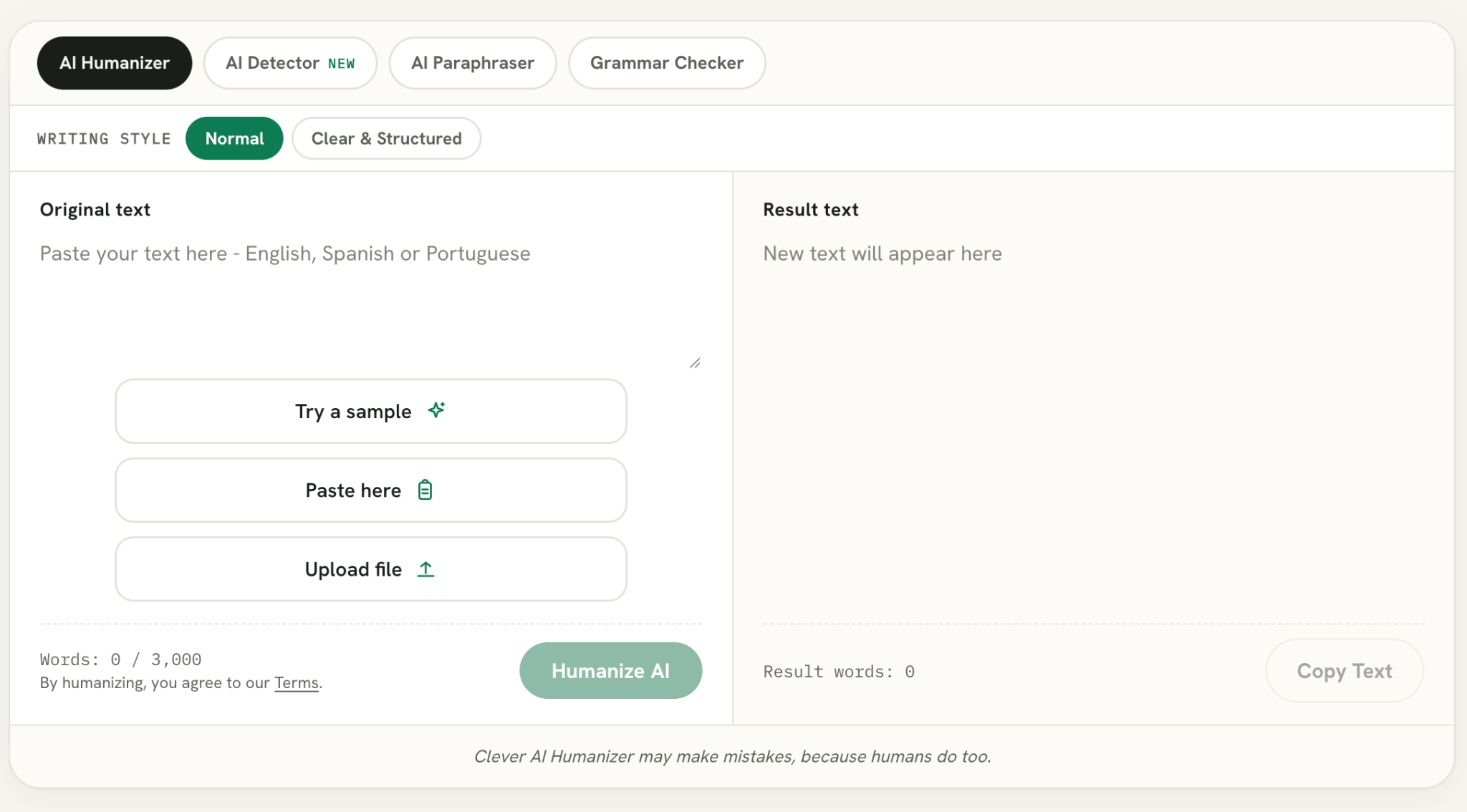
The platform brings several writing tools together on one website. The humanizer is its central feature, but users can also check text, paraphrase passages, and correct grammar. Each tool addresses a different part of the editing process.
1. AI Text Humanization
The main tool revises sentence structure, wording, transitions, and tone. It aims to remove repetitive phrasing and make the text easier to follow while preserving the original point. This is more useful than simply swapping individual words, particularly when a draft feels stiff or overly formal.
You can process up to 3,000 words in one request. There is no fixed monthly word allowance, and the website allows users to paste text, upload a document, or try a sample. Once processing is complete, the revised version appears in a separate panel.
The comparison option makes it easier to review what has changed. This matters because a rewritten sentence may sound smoother but lose a detail that was important in the original. Treat the result as an editing suggestion, not a finished article that can be published without checking.
2. Writing Styles
Clever AI Humanizer currently offers two styles: Normal and Clear & Structured. They provide a simple way to adjust the tone according to the type of content you're working on. There isn't a long list of presets to work through.
Normal: A general-purpose option for blog posts, website copy, social media content, and everyday writing.
Clear & Structured: Intended for reports, summaries, and professional documents where direct language is more appropriate.
For most online content, Normal is the natural starting point. Clear & Structured may be a better fit for business writing or material that needs to communicate information without unnecessary wording. It's worth trying both on a short passage to see which result suits your audience.
3. Other Writing Tools
Clever AI Humanizer also includes an AI Detector, an AI Paraphraser, and a Grammar Checker. These tools are useful for different tasks, so their features and language support shouldn't be confused with those of the main humanizer.
AI Detector: If you want to detect AI-written text, this tool analyzes a passage and estimates whether it may have been generated by artificial intelligence. It supports up to 10,000 words per check and provides sentence-level signals to help identify sections that may need a closer look. Keep in mind that its score is an estimate, not proof of authorship, as human-written content can also receive a high AI probability.
AI Paraphraser: This tool gives users more control over how a passage is rewritten. It offers 22 styles, adjustable rewriting strength, length settings, and an option to protect specific words from changes. It supports more than 25 languages and handles up to 3,000 words per request. It's useful when you need to rephrase your text while keeping the central meaning intact.
Grammar Checker: The grammar tool reviews spelling, punctuation, clarity, and other writing issues. Instead of automatically applying every change, it explains individual suggestions and lets you accept or reject them. It supports more than 25 languages and processes up to 3,000 words at a time.
How Does Clever AI Humanizer Work?
You don't need to install software to use the platform. The editor runs in a browser, and the main humanization feature is available without creating an account. The interface is straightforward, even if you've never used a text-rewriting tool before.
The process takes just a few steps:
Open cleverhumanizer.ai.
Paste your text or upload a document.
Choose Normal or Clear & Structured.
Select the humanization option.
Read through the revised version and copy it if you're happy with the result.
It's worth comparing the new version with your original before using it. Check names, figures, technical terms, and any statements that need to remain precise. Registered users can also access Content History, which makes it easier to return to earlier work.
Who Is Clever AI Humanizer For?
The tool is aimed at people who already use AI as part of their writing process. Bloggers may use it to tidy up article drafts, while marketers can work on product descriptions, emails, or social media posts. SEO specialists may also find it useful when polishing website copy.
Freelancers and business professionals have other practical reasons to use it. They might want to improve a proposal, make a report easier to read, or adjust the tone of a client email. The paraphraser and grammar checker are useful additions when a draft needs more than a simple rewrite.
Still, no writing tool can take responsibility for the accuracy of the final document. Research, fact-checking, and subject knowledge remain the writer's job. The best results come when the tool supports editing rather than replacing it.
Pricing and Free Usage
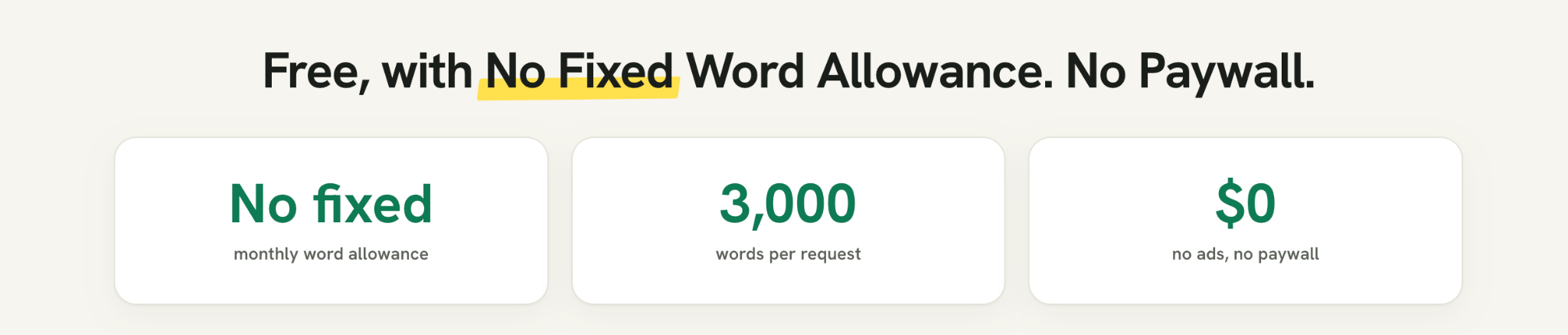
Clever AI Humanizer is currently listed as free on its official website. There are no advertisements or paywalls, and the main tool allows up to 3,000 words per request. The site also states that there is no fixed monthly word allowance.
You don't need an account to use the basic humanizer. Registration provides access to Content History, which can be useful if you work on several drafts and want to revisit previous results. It doesn't unlock a separate monthly word allowance.
The company's Terms of Service explain that the platform is still being developed and that features or usage limits may change. So, while the current free offer is appealing, it's sensible to check the website for the latest conditions before relying on it for regular work.
Privacy and Security
It's worth checking a tool's privacy policy before uploading work documents or unpublished content. Clever AI Humanizer states that submitted text is not used to train or fine-tune its AI models and that the company does not sell user data.
The retention details depend on how you use the service. For registered users, submitted text and generated results are generally stored for 30 days. For guests, only the first 100 characters of submitted text are retained for two days; the rest of the text and the generated result are not stored under that guest-use policy.
The company may use submitted material for debugging and quality checks, and authorized staff may review samples. For that reason, avoid uploading confidential business information or sensitive personal documents unless you're comfortable with the terms. The service is intended for adults aged 18 and over.
Advantages and Limitations
The main attraction is the combination of free access and several useful editing features. The interface doesn't require much setup, and the word allowance is generous enough for many everyday writing tasks. Having a humanizer, detector, paraphraser, and grammar checker in one place is convenient.
There are a few limitations to keep in mind:
Advantages
Free access with no advertisements or paywall.
Up to 3,000 words per humanization request.
No fixed monthly word allowance.
Two styles for different types of writing.
Additional paraphrasing, grammar, and detection tools.
Optional account with Content History.
Limitations
The main humanizer supports English, Spanish, and Portuguese.
Longer documents need to be split into separate requests.
Rewritten content still needs proofreading.
AI detector results are estimates, not proof.
The company does not guarantee uninterrupted availability or that text will pass AI detectors.
Final Verdict: Is Clever AI Humanizer Worth Trying?
Clever AI Humanizer is worth considering if you regularly work with AI-assisted drafts and want a free way to improve their readability. Its main editor covers everyday rewriting needs, while the paraphraser and grammar checker offer more control when a passage needs additional work.
It makes the most sense for bloggers, marketers, SEO professionals, freelancers, and anyone who edits written content regularly. It won't replace research or careful proofreading, and its detector shouldn't be treated as an authority on who wrote a piece. But as a straightforward writing assistant with several useful tools in one place, it's a practical option to explore.