
In today’s digital age, voice transformation technology has become an essential tool for content creators, educators, gamers, and anyone looking to add a creative touch to their audio projects. Whether you want to play a different character, protect your privacy, or simply have fun with friends, an AI-powered male-to-female voice changer can unlock a world of possibilities. FineVoice AI Voice Changer stands out with its advanced features, diverse voice library, and intuitive interface, making voice transformation accessible and effortless for everyone. In this article, discover why you might need a girl voice changer, what makes FineVoice unique, and how you can use it to achieve professional and natural-sounding results.
Why Use a Male to Female Voice Changer?
A male-to-female voice changer allows anyone to transform their voice to a different age, accent, or gender with ease. Content creators can add diversity, humor, or authenticity to videos, podcasts, and animations by voicing female characters themselves. Voice actors can play multiple roles, including female characters, without the need for extra performers or expensive studio sessions. For casual users, it’s perfect for playful activities like prank calls or entertaining friends in group chats with a convincing female voice. Additionally, those seeking privacy in online interactions, virtual meetings, or social platforms can use a voice changer to protect their identity and remain anonymous.
What Makes FineVoice AI Voice Changer Unique?
- Advanced AI technology
FineVoice AI Voice Changer uses deep learning, voice conversion, and speech synthesis technologies to analyze and modify your audio, resulting in highly natural and customizable voice transformations.
- Wide selection of voices
Featuring a diverse library of over 1,500 AI voices, spanning animation, storytelling, advertising, and educational tones, FineVoice makes voice changing effortless for any purpose, ensuring you always find the perfect voice for your project.
- Realistic voice output
Delivering crisp and authentic voice output, perfect for podcasts, videos, e-learning, or professional voiceovers.
- Support for custom voices
In addition to its commercial AI voices, FineVoice supports custom voices you create yourself—whether through voice cloning, voice design, or uploading your own RVC model.
- Easy-to-use interface
The interface is designed to be intuitive and user-friendly, enabling users of all skill levels to access advanced voice features without technical complexity.
- Free features for all users
FineVoice offers a free version of its AI Voice Changer and other tools, allowing all registered users to access basic features at no cost.
How to Change Your Voice to a Girl with FineVoice AI?
Designed with an intuitive user interface, FineVoice AI Voice Changer allows all levels of users to transform their voices into another with ease. Here’s how to change your voice to sound like a girl using FineVoice.
Step 1. Go to FineVoice
Visit the FineVoice official website and sign up or log in. Click “Get Started” in the upper right corner to access the all-in-one AI voice tool.
Step 2. Upload Audio File
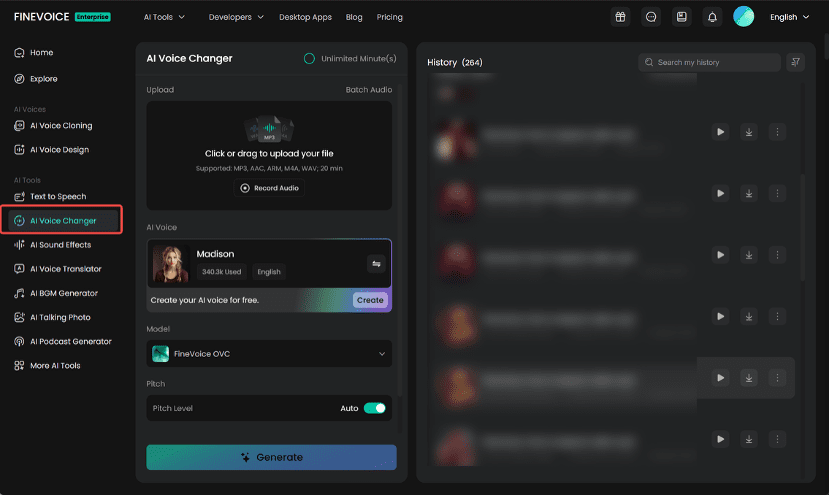
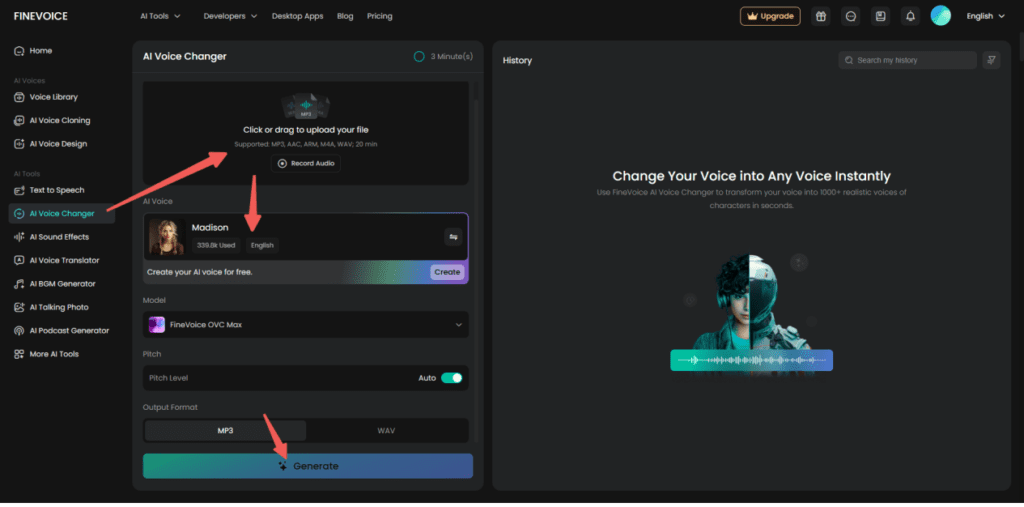
Navigate to “AI Voice Changer” and upload your audio file. You can load the file from your device, drag it into the upload area, or record audio directly using the web microphone.
Step 3. Select an AI Voice
Click the AI voice model to open the library and select a female voice that matches your project’s tone and requirements.
Tip: FineVoice also lets you create a unique voice through AI voice cloning and design.
Step 4. Adjust Advanced Settings (Optional)
Adjust additional settings as needed.
- Choose a voice changing model: FineVoice OVC or OVC Max. Most AI voices support both, but some (especially your custom voices) only support OVC Max.
- Toggle Auto Pitch Level on or off. Auto Pitch automatically adjusts vocal pitch based on your selected model. If disabled, you can manually adjust the pitch for your male-to-female transformation.
- Select your preferred output format (MP3 or WAV).
Step 5. Change Voice to Female
Click “Generate” to transform the voice to female. The process may take a few seconds to several minutes, depending on the audio length. Once finished, preview the result, edit the audio title, and download it for sharing or future use.
Real-Life Applications
FineVoice’s boy-to-girl voice changer lets you effortlessly transform your voice for audiobooks, social media, professional messages, or privacy protection—unlocking creative and practical possibilities with ease.
- Video Editing and Post-Production: Replace original voices with a girl’s voice in movies, series, or short films to make characters more vivid, better fit storylines, and enhance your video’s appeal.
- Podcast and Audio Storytelling: Transform pre-recorded audio segments into a female voice for podcasts, audiobooks, and radio dramas, adding variety and personality to your content.
- Social Media Content Creation: Enhance your TikToks, YouTube videos, or Instagram reels by applying female voices to clips before uploading, making your content more engaging and creative.
- Personalized Greetings and Messages: Record messages and convert them to a girl’s voice for unique birthday wishes, announcements, or voicemail greetings.
- Educational Materials: Create female narration for e-learning modules, language lessons, or instructional content by transforming teacher or narrator voices in post-production.
- Character Voice Development: Design and refine female character voices for games, animations, or interactive stories by processing recorded dialogue with an AI girl voice changer.
Tips for Getting the Best Results
To ensure your voice transformation is clear, natural, and professional, it’s important to follow a few best practices. Here are some helpful tips to maximize the quality and effectiveness of your results with FineVoice AI Voice Changer:
- Supported formats include MP3, AAC, ARM, M4A, and WAV. Please ensure your audio is no longer than 20 minutes.
- For optimal voice transformation results, upload audio files that ideally contain a single language and one speaker. Mixing multiple languages or voices in one audio file may cause conversion errors. Also, record in a quiet environment and avoid using raw, unprocessed audio for direct voice conversion. It’s best to enhance your files by removing noise, long silences, or extended silent segments beforehand.
- For high-quality and consistent results when converting multiple audio files, use the “Batch Audio” feature. Simply submit your audio links, specify the duration and target AI voice, and FineVoice will process your files in bulk as requested.
Conclusion
FineVoice stands out as one of the best free male-to-female voice changers thanks to its advanced AI technology, vast library of voices, realistic output, and user-friendly interface. Whether you’re a content creator, educator, voice actor, or casual user, FineVoice empowers you to transform your voice for creative projects, professional tasks, or privacy protection—all with ease and reliability.
With free access to essential features and support for custom voices, FineVoice offers unmatched versatility and value. Experience the convenience and quality of FineVoice’s AI girl voice changer for yourself, and discover new possibilities for your audio content.
Try the AI girl voice changer now for an instant transformation!